I normally recommend people stick with the default indicator settings – they are tried and tested, and there’s no such thing as ‘perfect’ settings – they all have weaknesses. It’s about understanding the indicator and learning its strengths and weaknesses, rather than trying to ‘fix’ it.
But here I want to show you a little trick. It involves doubling up on the MACD indicator, and applying very different settings to each. The first gives us a far-sighted early warning system of where a trend is about to change … the second gives us a lightning-fast trigger when that change happens.
The MACD powerhouse indicator
The MACD is a really powerful tool for traders. It’s a little powerhouse of moving-average data – all filtered down into a simple-to-read indicator.
It takes the form of two lines and a histogram, looking something like this …
The faster line is the moving average of the distance between two moving averages … the slower line is a smoothed out moving average of the first line … and the histogram plots the two lines moving closer and further apart.
(On some trading platforms – like the one above – the histogram changes colour depending on whether it’s above or below zero. On others – like the ones below – it’s green when getting bigger, and red when getting smaller. But don’t worry about the histograms, as I won’t be using them here.)
So, what do all these lines and bars have to tell us?
The MACD can tell us about momentum building in a market price, and give us clues about when trends are running out of steam. The place the MACD falls down is that it’s a lagging indicator, which means that it relies on what’s happened to predict what’s going to happen.
This means that if you have the settings turned up too fast, you’ll get lots of false signals. And if you have the settings on too slow, you’ll get into trades too late.
The solution most traders go for is to find some middle ground – not too fast, not too slow.
But here I want to show you a different solution … where we use a double MACD – one to cover each ‘job’.
The standard MACD default settings that you’ll find on most trading platforms are: 12, 26, 9.
Instead, we’re going to hack those settings twice, putting two different MACDs on our charts:
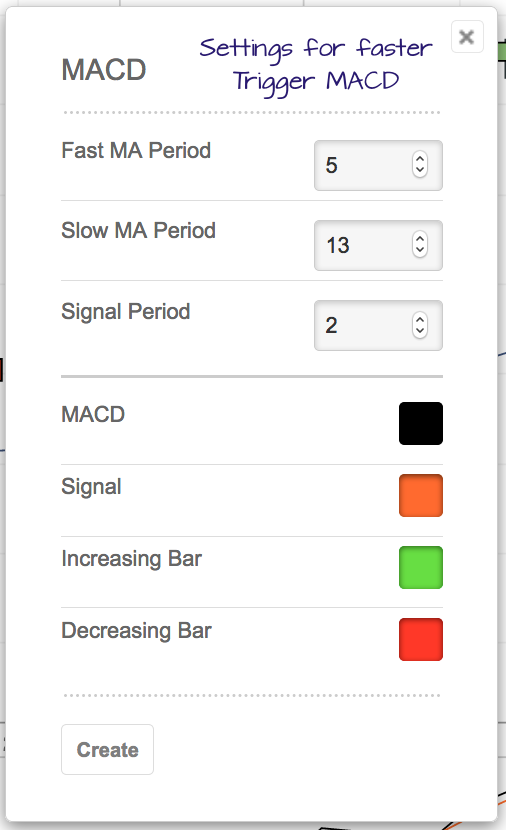
A fast MACD setting (this’ll be our trigger): 5, 13, 2
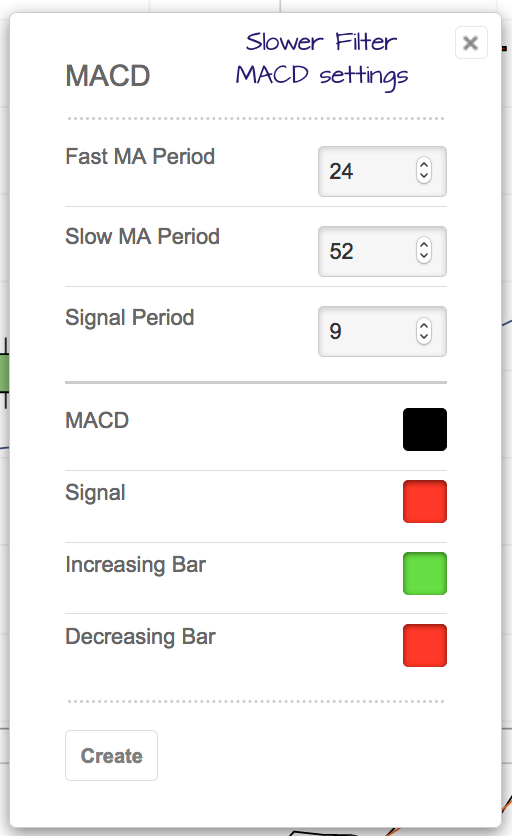
And a slower MACD setting (this’ll be our filter): 24, 52, 9
This is how I set them up on my broker’s platform …
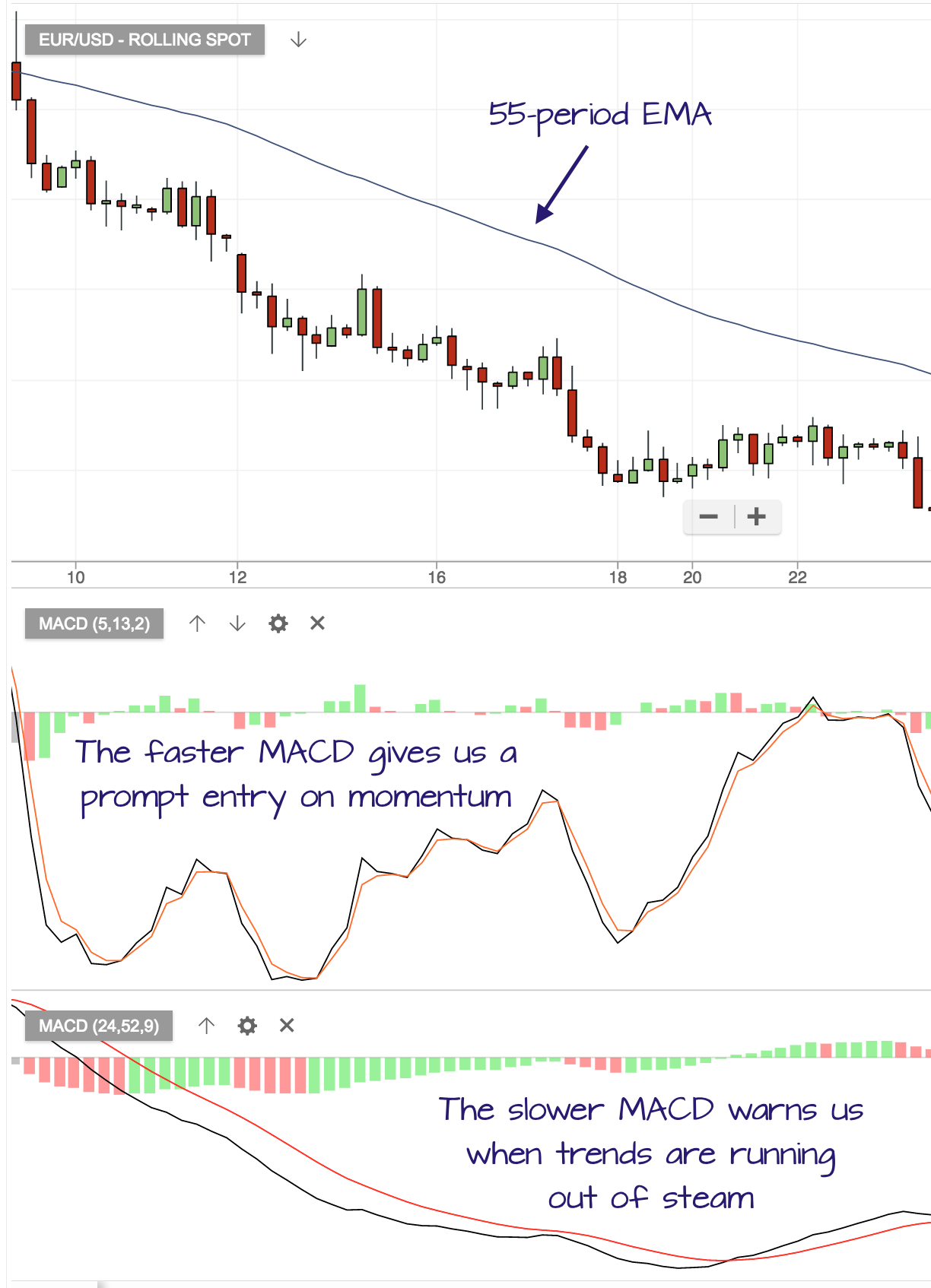
I’m also going to add a 55-period Exponential moving average to my chart, which will act as a guide for stop levels.
Applied to a 4-hour forex chart, you can see how different these two MACD readings are …
The fast MACD jumps about during the trend, while the slow MACD filters noise out of the price action.
Applying the Double MACD
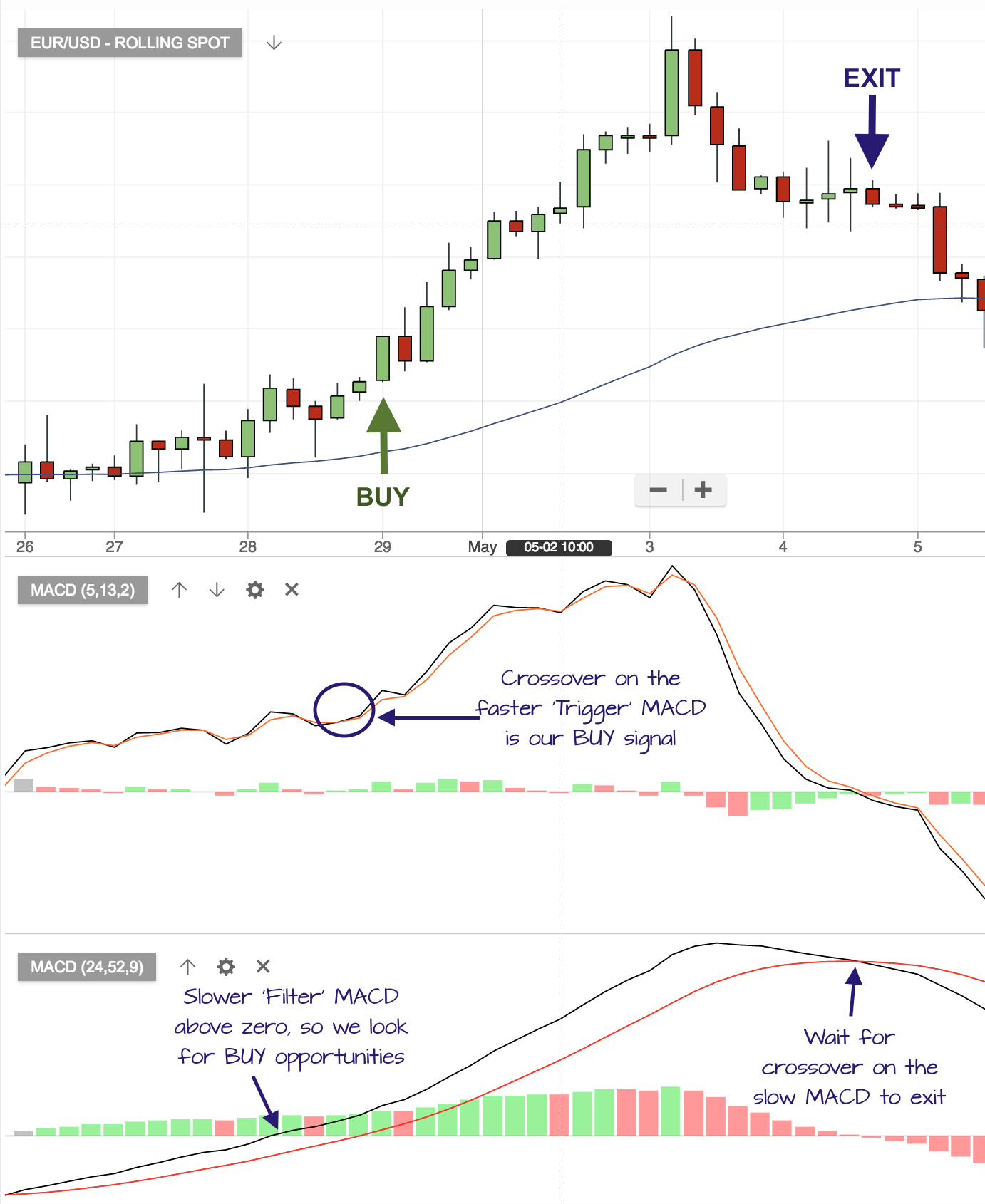
Here’s an example of the kinds of signal we can get from this pairing.
I will only take a buy trade if the slower MACD level is above zero, and will only take a sell trade if it’s below zero.
The price also needs to be below the moving average for a sell, and above the moving average for a buy.
The trigger to open a trade is a crossover on the faster MACD.
The trigger to exit a trade is a crossover on the slower MACD.
Here’s an example …
With trading strategies, there’s always a temptation to load more and more indicators onto our charts, and I believe it’s an error to overburden our charts. Just because I think the MACD is a great indicator, doesn’t mean that two MACDs will be better than one. (It’s that kind of logic that landed me with 3 children and 2 dogs!)
I’m planning to do some more testing on this double MACD trading. If you have any thoughts – please share them at the foot of this page.
Just checking I’ve understood your question correctly … do you mean that the fast MACD has had the crossover, but the slower MACD is still below zero … do we then enter when the slower MACD crosses over into positive territory? I’d not that this kind of trade – the fast MACD is there to give us a nice early entry. In this situation, we risk having missed the move – I’d sit tight and wait for the next signal.
Hi Jerome, Thanks for your message. In theory, the same numbers should work in the same way across different timeframes. I haven’t explored this on longer timeframes – would be interested to hear how you get on.
Hi Mark
Happy new year and thank you for your support and help on this subject. I’ve been using MACD for a while and it is doing quite well, however I struggling to have it providing a good exit…
I noticed your graphs are placed on Hours. What settings would you suggest for a daily trading?
Kind regards
Jerome
Great idea ! The slower MACD crossover (change of histogram colour) gives potential turning points which are then confirmed by faster MACD histogram signal line being above zero for long or below zero for short. This makes for earlier entries into trend reversals.
Interesting, Mark. It’s the first time I have seen MACD so clearly explained, and your double-MACD is certainly interesting. Would it work on a shorter timeframe, say 5m or 15m, to give scalping entries?









8 comments
Monty
What if the faster MACD already had a crossover before the lower MACD did? Do I enter the trade
Traders Bulletin
Just checking I’ve understood your question correctly … do you mean that the fast MACD has had the crossover, but the slower MACD is still below zero … do we then enter when the slower MACD crosses over into positive territory? I’d not that this kind of trade – the fast MACD is there to give us a nice early entry. In this situation, we risk having missed the move – I’d sit tight and wait for the next signal.
Mark Rose
Hi Jerome, Thanks for your message. In theory, the same numbers should work in the same way across different timeframes. I haven’t explored this on longer timeframes – would be interested to hear how you get on.
Jerome
Hi Mark
Happy new year and thank you for your support and help on this subject. I’ve been using MACD for a while and it is doing quite well, however I struggling to have it providing a good exit…
I noticed your graphs are placed on Hours. What settings would you suggest for a daily trading?
Kind regards
Jerome
reza
HELLO
Do you have telegram group if have please give me you link
Paul
Great idea ! The slower MACD crossover (change of histogram colour) gives potential turning points which are then confirmed by faster MACD histogram signal line being above zero for long or below zero for short. This makes for earlier entries into trend reversals.
Geoff
Yes very interesting Mark, I will investigate this.
Ray – I would imagine you could have a workable system for shorter timeframes, but with smaller parameters than above. Have you looked at this Mark?
Ray
Interesting, Mark. It’s the first time I have seen MACD so clearly explained, and your double-MACD is certainly interesting. Would it work on a shorter timeframe, say 5m or 15m, to give scalping entries?