Bad cable management, XY problems and Alligator solutions
There was a lot of noise coming from my son’s room. I’m talking about the sound of power tools. He came downstairs a few times, asking where he could find more drill bits, and I pointed him in the right direction, trying not to get involved and micro-manage his project …
Later, I went to investigate.
He’d wanted to do some ‘cable management’ on his desk. The plan was to feed his monitor leads through a hole he was making in the desktop. What he’d really needed was a screwdriver to remove the plug from the end of the cable. But the solution he’d chosen was to drill a series of large fist-sized holes through the desk.
To be fair, he’s the son of a man who’s favourite ‘fix’ is to hit it with a hammer, so I shouldn’t be surprised that he’d be using the wrong tool for the job.
https://sketchplanations.com/the-xy-problem
Of course, the wrong tools can often get jobs done. I’ve used knives to open jars (and have drawer full of broken knives to prove it) … the ‘hit it with a hammer’ solution really does work sometimes … and we’ve all seen the movies where they tunnel out of prison with just a spoon.
And my son DID get the cables through his desk (although the result looks like the work of a beaver).
FINDING SOLUTIONS
Technical support teams, and software developers first started talking about the XY problem – but it crosses over into everyday life in all kinds of places.
And it’s definitely an issue in our trading, where wrong tools frequently get the blame for failed signals. We chop and change our indicators and our indicator settings, trying to find the perfect sweet-spot. But we focus on the wrong solution.
THE PROBLEM: MY SIGNAL IS TOO LATE – if I speed up the settings on it, I’d have got the signal 3 bars sooner, and made a profit
I expect we’ve all done it … looked at that moving average, PSAR, MACD crossover that missed the market move, and wondered if we just changed the settings … our fortunes could be so different.
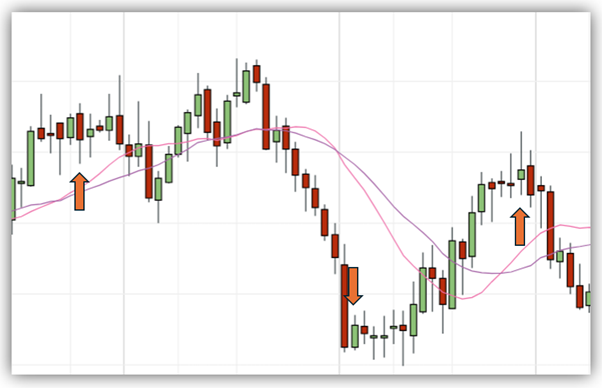
Signals are either too slow, and by the time they’ve kicked in, that move has passed. Like these too-late buy/sell signals from a moving average crossover.
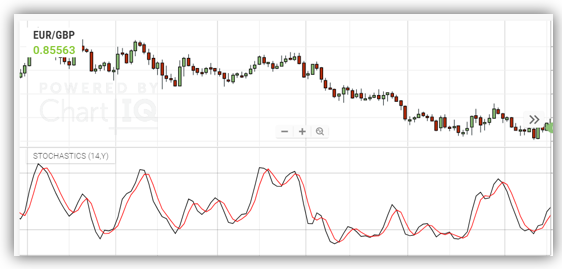
Or they’re too fast, like this Stochastic, which gives jumpy crossover signals every twist and turn of the market price …
The crux of the problem is that we need the right tool for the right job.
BAD TOOLS VS WRONG TOOLS
If you find yourself tweaking the settings on your indicators, there’s a good chance that you’re stuck in an XY loop – fixing a tool that’s just not suitable for the job you’re asking of it.
Take the Alligator indicator as an example. It consists of three lines:
The Lips: a green 5-period smoothed moving average, shifted by 3 periods to the right
The Teeth: a red 8-period smoothed moving average, shifted by 5 periods to the right
The Jaws: a blue 13-period smoothed moving average, shifted by 8 periods to the right
The three lines represent the bite of the alligator against the price levels – first contact comes with the lips, then teeth, then conclusively with the jaw.
When the three moving averages are aligned – we have the alligator in feeding mode. This represents the trending phase of the market.
When the three moving averages are intertwined, the alligator is in sleeping mode. This tells us that there is no clear trend.
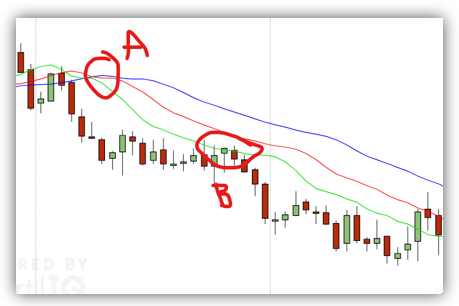
If we wanted to use the Alligator indicator to tell us when a trend is starting, our signals would look a bit like this one at ‘A’ …
By the time our three moving averages are lined up at ‘A’, that part of the move is over and the market is into a consolidation phase.
The first reaction might be that we need to speed up the indicator – shorten the number of periods on the settings, or reduce the lag on it?
But the Alligator indicator is NOT DESIGNED to give us snappy entries (don’t be fooled by the indicator name!) To try to find entries at ‘A’ is misunderstanding what this kind of indicator is designed for.
This is a lagging indicator that’s been actively slowed down!
Where the magic of the Alligator indicator happens is at ‘B’, when the price touches back to the lips.
Lagging indicators like Alligator are all about ‘zones’. They tell you when to starting looking for those entry signals. You’re better off looking elsewhere for your ‘trigger’ or ‘confirmation’ signals.
If you’d like to find more details on my Alligator strategy, that combines this slow-mo lagging indicator with a jittery Stochastic – really focusing on the jobs these tools SHOULD be doing –CLICK HERE.
HOW TO KNOW IF WE’RE USING THE RIGHT TOOLS FOR THE JOB
If something isn’t working, keep digging into what the real issue is. Why do you have those settings? What’s the indicator’s job? If you speed up/slow down the indicator, are you undermining its original task?
Think about the ‘Five Whys’ – a test that originated from Toyota, in its manufacturing process: Ask ‘why’ five times to get to the root of the issue …
Problem: The engine in a newly manufactured car is overheating. Why is the engine overheating? The cooling system is not effectively reducing the engine’s temperature. Why is the cooling system not effectively reducing the engine’s temperature? The coolant is not circulating properly through the engine. Why is the coolant not circulating properly? There is a blockage in the cooling system preventing the flow of coolant. Why is there a blockage in the cooling system? The radiator is clogged with debris due to a contamination during the manufacturing process. Why was the radiator contaminated with debris during the manufacturing process? The factory cleaning process lacks a proper quality control system to prevent contamination of components.
It’s about digging under the surface at what we need …
Problem: My signals are failing Why are your signals failing? My signals are coming after the market move has happened Why are the signals coming after the market move? Because I’m not getting a trigger to tell me when the price will start moving in a direction Why aren’t you getting a trigger to tell you when the price starts moving? Because I’m using a lagging indictor based on previous price action Why are you using a lagging indicator to show previous price action? Because I also want to know the overall market direction in the longer term Why do you want to know overall market direction? So I can find the biggest moves when I do enter the market
What we can uncover is that ‘failing’ indicators may well be doing another, extremely important task (or we may find that they’re completely redundant and should be thrown out). Getting the right tools for the job involves having some understanding of what the jobs are that we need our indicators to do.
I’d urge you to look at your indicators under the task types, rather than just ‘trend’ or ‘momentum’ classifications. You need Zone, Trigger & Confirmation tools. And you can find out more here.